
KAYA: THE CLIMBER’S APP
KAYA ClimbingSports
3.9305.00 Reviews
- Version
- 3.52.4
- Installs
- 100.00K
- Age Rating
- Teen
Screenshots

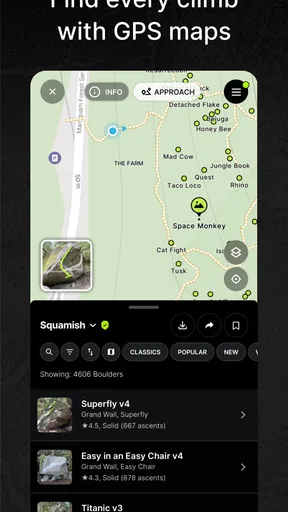
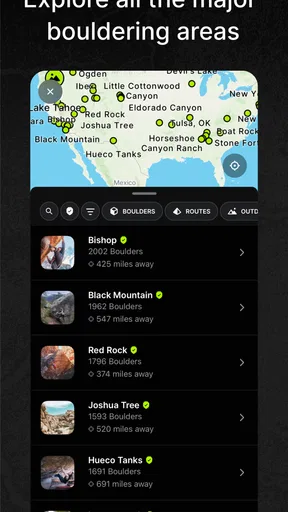
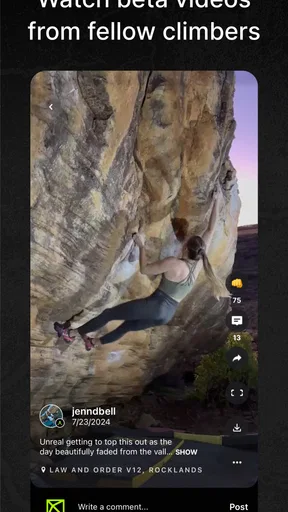
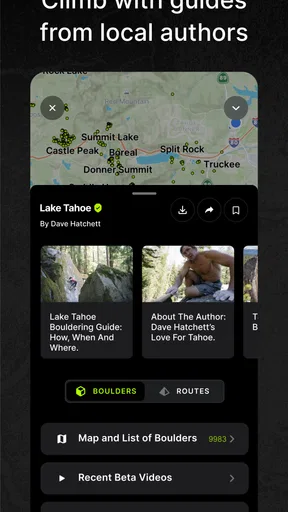
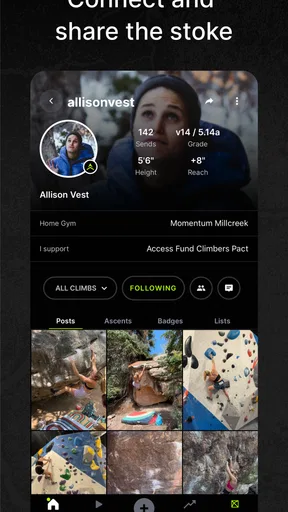
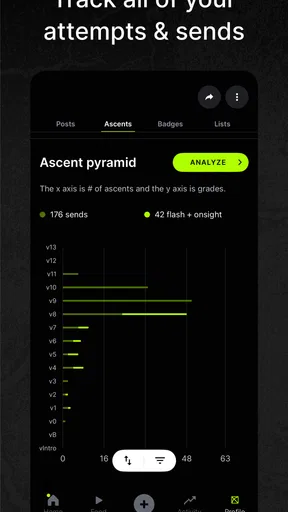

Our Review of KAYA: THE CLIMBER’S APP
 Analysis by Appyee
I came away from KAYA: THE CLIMBER’S APP with the feeling that it is aimed less at casual fitness browsing and more at people who already think in terms of climbing sessions, problems, attempts, and progression. That distinction matters. This is a free sports app from KAYA Climbing, and its central appeal is the promise of putting climbing information and motivation in one place rather than making you rely on memory, scattered notes, or conversations at the gym.
My overall view is positive, but specific: KAYA is most useful when climbing is already a regular part of your week. If you visit a bouldering gym occasionally and only want a simple workout timer, it may feel more involved than necessary. If you like trying new problems, remembering what you have climbed, and staying connected to the activity between visits, it has a much clearer purpose. The app has reached over 100K installs and holds a 3.9 average from more than 600 ratings, which suggests a useful but not universally effortless experience.
What makes KAYA worth opening at the gym
I find KAYA most worth opening when I have a clear reason to use my phone: choosing a problem, checking a possible approach, or keeping a useful thought from disappearing after an attempt. A small habit that helps is to decide before I unlock the screen what I want to learn, then put the phone away and test it on the wall. That keeps the app in a supporting role and makes the next section’s practical benefits easier to judge.
A climbing-first approach instead of a generic fitness dashboard
The first strength is its focus. Many sports apps are built around broad goals such as steps, calories, running distance, or workout duration. KAYA speaks to a different kind of athlete: someone who looks at a wall and wants to decide which problem to try next. That narrow focus helps the app feel relevant in a way a general exercise tracker usually does not.
In my experience, a climbing session can become surprisingly unstructured. I may arrive with a vague plan, spend too long on one difficult problem, forget which easier routes I enjoyed, and leave without a clear sense of what actually happened. A dedicated climbing app can reduce that mental clutter. KAYA’s value is not simply that it belongs in the sports category; it is that it treats climbing decisions as the main event rather than as a minor variation of a gym workout.
The store summary, “All the beta. All the stoke.”, captures the intended mood without explaining the practical benefit. For me, the useful interpretation is that the app is designed around sharing and discovering climbing knowledge. “Beta” is not just information in the abstract. It can mean seeing how another climber approached a problem, comparing styles, or finding an idea when a route feels impossible. That makes the app more interesting than a basic logbook, provided you enjoy learning from other climbers.
Useful before, during, and after a session
I would use KAYA in three distinct moments. Before climbing, it can help me decide what I want to work on rather than wandering around the gym without a plan. During the session, it can support choices about which problems deserve another attempt and which ones are better left for later. Afterward, it gives the session more continuity because the experience does not disappear as soon as I leave the building.
That last part is easy to underestimate. Progress in climbing is often uneven. One day I may feel strong but fail to finish a problem because of technique; another day I may unexpectedly complete something that had stopped me before. A climbing-focused record helps separate those experiences. It encourages me to think about what changed: body position, foot placement, pacing, confidence, or simply the decision to try again.
A realistic example would be a weekday visit after work. I have limited energy and perhaps only an hour. Instead of attempting everything that catches my eye, I can use the app to keep the session focused: choose a few problems, pay attention to the ones that expose a weakness, and leave with a clearer idea of what to revisit. That is a better use of a short session than treating every wall as an endless list of possibilities.
Community knowledge can be more valuable than raw tracking
The strongest reason to choose KAYA over a plain notes app is the climbing context around the information. A note saying “failed on blue route” tells me very little a week later. A route-oriented record or community contribution can preserve more useful context: what felt difficult, which sequence worked, and whether the problem suited my style.
There is also a social benefit. Climbing is often friendly in person, but not every climber feels comfortable interrupting someone to ask for advice. An app can make discovery less awkward. I can look for ideas at my own pace, compare approaches, and decide whether a suggested method fits my body and experience. This is especially helpful for newer climbers who may not yet know how to describe the movement they are struggling with.
However, I would not treat any beta as a guaranteed solution. Climbing is personal, and a method that works for a taller climber, a more flexible climber, or someone with different strengths may not translate directly. The best way to use shared information is as a starting point, not an instruction manual. KAYA is more useful when it encourages experimentation than when it turns every problem into a single correct sequence.
A practical workflow for getting more from the app
My advice is to avoid opening KAYA only when you are already tired and frustrated. Use it as part of a small routine. Before a session, choose a manageable target and a stretch target. During the session, notice whether a failure comes from strength, balance, timing, or reading the sequence. Afterward, save a short personal note in whatever form the app allows you to use comfortably, rather than relying on the vague memory that a problem was “nearly done.”
A second useful habit is to review patterns across visits instead of judging yourself by one session. If you repeatedly avoid slab problems, for example, the app can become a prompt to include more technical climbing rather than another collection of hard attempts. If you keep returning to powerful overhangs, you may discover that your enthusiasm is ahead of your endurance. The app cannot make that decision for you, but it can make the pattern easier to notice.
A third tip is to use community beta selectively. Look at it after making an honest attempt, especially if your goal is to improve route reading. If you view the solution immediately, you may complete the problem but learn less about how you would have solved it independently. If you are specifically training movement or trying to understand a sticking point, checking beta earlier can be completely reasonable. The trade-off is between immediate progress and developing your own problem-solving ability.
Where the experience may become frustrating
The biggest limitation is that a specialized climbing app depends on the quality and consistency of the information around it. A digital record is only as useful as the routes, contributions, and updates that support it. If the content for your gym or the problems you care about is incomplete, outdated, or difficult to navigate, the app loses much of its advantage over a simple notebook.
This is also where expectations need to be realistic. KAYA is not a replacement for a coach watching your movement in person. It cannot reliably identify why your hips are drifting away from the wall, whether a shoulder position is unsafe, or whether fatigue is changing your technique. Shared beta can inspire an adjustment, but it should not override sensible judgment about pain, recovery, or personal limits.
The app is free to download, but in-app purchases range from $7.99 to $99.99 per item. That does not automatically make it poor value, yet it does mean I would explore the free experience carefully before committing to anything paid. A user who only wants occasional route inspiration may be satisfied without spending money. Someone who expects every useful part of the climbing workflow to be included at no cost should check what is available in practice and decide whether the paid options match their habits.
There is another kind of friction that affects nearly every app used inside a climbing gym: attention. Looking at a phone between attempts can break concentration, interrupt a conversation, or encourage endless browsing instead of climbing. I would keep sessions simple and avoid turning the app into a second activity. The point is to support time on the wall, not replace it.
Who will appreciate it most
I think KAYA is a strong fit for regular boulderers and climbers who enjoy tracking personal progress without reducing the sport to a spreadsheet. It is particularly appealing if you often visit different walls, like learning from other climbers, or struggle to remember which problems you wanted to revisit. It can also suit a motivated beginner who wants a clearer way to understand climbing culture and vocabulary while developing a personal process.
Intermediate climbers may get the most practical value because they are often past the novelty stage but still searching for ways to break through plateaus. At that point, the question is no longer just “Can I climb?” but “Why do I keep failing this kind of movement?” A climbing-specific app can help organize those questions and make experimentation more deliberate.
I would be more cautious recommending it to someone who climbs once every few months, wants only a general exercise log, or dislikes community-driven content. A paper notebook may be faster for a climber who records only a few personal observations. A general fitness app may be better for someone whose main goal is monitoring workouts across several sports. A coach, training plan, or direct feedback from experienced partners is preferable when the main need is technical correction rather than route discovery.
Everyday use without losing the human side of climbing
One thing I like about the concept is that it can support both solitary and social climbing. If I arrive alone, I can still have a structured session and look for ideas without needing to know everyone in the gym. If I arrive with friends, the app can give us something specific to discuss: a problem, a sequence, or a different way to approach a move.
Still, I would not let digital information replace conversation. Some of the best climbing advice is situational. A person standing beside the wall can notice that I am rushing, over-gripping, or ignoring an obvious rest. An app can preserve knowledge and make it easier to revisit, but it cannot reproduce the timing and empathy of a good climbing partner. The best use is complementary: use KAYA to prepare and remember, then use real people and your own body awareness to make the final decisions.
Device and audience details to keep in mind
KAYA is available as a sports app for Android, with a minimum operating system requirement of Android 7.0. The current version is 3.52.4, so users with older devices should pay attention to compatibility before planning around it. Its content rating is Teen, which fits an app centered on climbing participation and community interaction rather than a children’s game.
The developer is KAYA Climbing, and the app has been available since September 26, 2019. That gives it a longer presence than a brand-new climbing experiment, while the current version indicates that the product continues to be maintained. I would still judge it by how smoothly it fits my own gym routine, because longevity alone does not guarantee that every screen or workflow will suit every climber.
The public response is mixed but encouraging: a 3.9 average across more than 600 ratings and over 300 written reviews. I read that as a sign that the idea clearly works for many people, while also leaving room for differences in expectations and day-to-day usability. The rating is not high enough for me to recommend installing it blindly, but it is strong enough to justify trying the free version if climbing is already part of your routine.
My verdict after weighing the trade-offs
KAYA works best as a climbing companion, not as a universal fitness app. Its focused identity is both its greatest strength and its main boundary. The more often I climb and the more interested I am in route discovery, shared beta, and remembering progress, the more sense it makes. The less connected I am to those habits, the easier it is to see the app as unnecessary overhead.
I would recommend starting with a specific purpose rather than downloading it because it sounds useful. Use it to organize a session, investigate a recurring weakness, or preserve problems you want to revisit. Give the free experience enough time to prove that it fits the way you climb before considering any in-app purchase. That approach keeps the decision practical instead of turning the app into another obligation.
For me, the clearest benefit is that KAYA can turn scattered climbing experiences into a more intentional process. It helps connect what I try today with what I want to improve next time. Its weaknesses—dependence on useful content, the distraction of phone use, paid options, and the limits of remote advice—are real, but manageable when expectations are sensible.
If you want a simple all-purpose workout tracker, I would choose something broader. If you want a digital space built around climbing problems, beta, and the rhythm of repeated sessions, this is worth exploring. I would describe it to a friend as a focused tool for climbers who want more continuity between attempts, with enough practical value to earn a place in the routine but not enough universality to suit everyone.
Verdict
Strengths of KAYA: THE CLIMBER’S APP
- Tracks climbing sessions, routes, grades, and personal progress in one place.
- Useful training insights can help identify strengths and areas to improve.
- A focused interface makes logging climbs quick between attempts.
- Helpful for keeping a personal history across different climbing gyms.
- Can support more structured goals for regular climbers and training plans.
Limitations of KAYA: THE CLIMBER’S APP
- Its usefulness depends on manually recording climbs consistently.
- Advanced features may be less valuable for casual or occasional climbers.
- Some route details may need updating when gyms frequently change problems.
- Progress comparisons can vary because grading systems differ between gyms.
- The app may feel too specialized for users who practice several sports.
Similar Picks in This Category
View All
BeSoccer: Soccer Live Score
BeSoccer apps4.3

Cricbuzz - Live Cricket Scores
Cricbuzz.com3.7

NFL
NFL Enterprises LLC2.4

Da Fit
MO YOUNG LIMITED3.6

ESPN
Disney4.5

LiveScore: Live Sports Scores
LiveScore Limited4.5
Frequently Asked Questions
What is KAYA: THE CLIMBER’S APP used for?
KAYA is a digital platform designed for climbers who want to discover routes, plan outdoor sessions, and keep useful climbing information in one place. It can help users explore crags, check route details, organize objectives, and connect with the wider climbing community. Its usefulness depends on the locations and data available in your region, so coverage may vary between countries and climbing areas.
Does KAYA work for both indoor and outdoor climbing?
KAYA is primarily focused on helping climbers find and manage outdoor climbing information, although some features may also be useful for people who climb indoors. Before downloading, check the current app description and available database for your preferred climbing areas or gyms. Route availability, grades, photos, descriptions, and other details can differ depending on community contributions and local coverage.
Do I need an account or subscription to use KAYA?
Some basic features may be available after installing KAYA, but an account could be required for saving routes, recording activities, contributing information, or synchronizing data across devices. The app may also include optional premium tools or subscription plans. Because pricing and included features can change, review the latest information in the Google Play Store or App Store before creating an account or starting a trial.
Can I use KAYA without an internet connection?
KAYA may require an internet connection to browse updated route information, load maps, synchronize your profile, or access community content. Depending on the version and your account plan, some information may be available offline after it has been saved or downloaded in advance. Climbers heading to remote areas should prepare carefully, download any available data beforehand, and never rely exclusively on the app for navigation or safety.
Is the information in KAYA accurate enough for planning a climbing trip?
KAYA can be a helpful planning resource, but its route descriptions, grades, access notes, conditions, and photographs may come from users or other changing sources. Information can become outdated because of closures, weather, rockfall, access restrictions, or updated grading opinions. Always verify important details locally, respect landowner and area regulations, check current conditions, and use appropriate climbing equipment and judgment.
